


Introduction: Building Future-Ready eCommerce Apps with FlutterFlow
The eCommerce landscape in 2026 continues to evolve at an unprecedented pace, driven by advancements in AI, changing consumer expectations, and the rapid growth of mobile commerce. Online shopping has become the preferred way for consumers to purchase everything from groceries and fashion to electronics and furniture. This presents significant opportunities for both startups and established businesses to build scalable eCommerce applications that deliver seamless and engaging shopping experiences.
However, developing modern eCommerce apps can be complex, time-consuming, and expensive. This is where FlutterFlow is transforming app development. As a powerful visual development platform, FlutterFlow enables businesses to create high-quality cross-platform eCommerce apps faster through drag-and-drop development, seamless Firebase and Supabase integrations, and support for custom code.
In 2026, simply building an online store is no longer enough. Customers expect intelligent, personalized, and frictionless experiences throughout their shopping journey. Modern eCommerce apps are increasingly adopting features such as:
- AI-powered search that understands user intent
- Personalized product recommendations based on behavior
- Real-time order tracking and delivery updates
- Fast, secure, and seamless payment experiences
- AI chat assistants for customer support and shopping guidance
Businesses that embrace these innovations will be better positioned to increase customer satisfaction, improve retention, and stay competitive in the rapidly evolving digital commerce landscape.

To stay competitive in 2026, a FlutterFlow eCommerce app must do more than simply function—it must deliver exceptional user experiences that encourage repeat purchases and build long-term customer loyalty. Modern eCommerce apps need to be intelligent, responsive, scalable, and built to adapt to future trends.
Whether you're an entrepreneur launching your first app, a FlutterFlow developer expanding your expertise, or an agency building solutions for clients, this guide will provide practical insights into creating high-performing eCommerce experiences that drive engagement, conversions, and customer satisfaction.
1. AI-Powered Smart Product Recommendations
Why AI Product Recommendations Are Essential

Have you ever opened a shopping app to identify that it somehow "knew" what you were looking for, before you typed anything? That's not magic; that's AI-powered product recommendations working their magic. In 2026, this won't be simply a nice-to-have feature but a requirement for your FlutterFlow eCommerce app to differentiate itself and provide a premium personalized shopping experience.
Today's shoppers are faced with thousands of products to browse, and choice fatigue is a real thing. Smart product recommendations alleviate this by surfacing the most relevant products based on user behavior, preferences, and past activity.
Real-World Implementation Examples
Real-world applications of AI recommendations in action:
- A customer who just added a new smartphone to their cart receives suggestions for wireless chargers, screen protectors, and phone cases
- Someone browsing summer dresses gets recommendations for matching sandals, handbags, and sunglasses
- A skincare enthusiast looking at moisturizers sees popular serums and eye creams trending among similar demographics
Building AI Recommendations in FlutterFlow
Technical Implementation Steps:
- Track User Behavior
- Use Supabase or Firebase to collect interaction data, clicks, product views, search queries, cart additions, and purchase history
- Integrate AI Recommendation Engines
- Connect with OpenAI, Flowise AI, or custom machine learning models via API to generate recommendations based on behavioral data
- Data Storage and Processing
- Implement secure data storage in Supabase for user data analysis and interaction review
- Create Dynamic UI Components
- Build dynamic widgets using horizontal carousels, grid cards, or custom components for real-time recommendation updates
- Real-Time API Integration
- Set up custom API calls that return relevant products triggered by user interactions
Key Benefits of AI Product Recommendations
- Higher Average Order Value (AOV) through intelligent upsells and cross-sells
- Reduced bounce rates with compelling personalized suggestions
- Enhanced customer experience through unique shopping journeys
- Improved personalization as the system learns and adapts over time
2. Voice Search and AI Chat Assistant Integration

The Importance of Conversational Commerce
In 2025, users want to interact with apps in the most natural way possible, either through speaking or asking for assistance, almost like talking to a human. Voice search and AI chat assistants have evolved from cool additions to essential features that represent accessibility, engagement, and effortless convenience.
Typing long queries and navigating through menus is becoming outdated. Voice search makes it simple and fast for users to engage in their shopping journey, whether multitasking, dealing with visual impairments, or simply preferring voice over typing.
Similarly, an AI Chat Assistant automates assistance with questions, order tracking, and product recommendations in real-time and does not require human support.
Real-World Voice and AI Assistant Scenarios
Practical applications of conversational eCommerce:
- "Hey [App Name], show me men's sneakers under $100" - The app immediately displays matching products
- "Where's my order?" - The AI assistant responds with live order status
- "Create a skincare routine for dry skin" - The bot curates a complete list with user-specific preferences
Technical Implementation in FlutterFlow
Voice Search Development:
- Integrate Google Speech-to-Text API to convert voice to search queries
- Connect voice search results to your product database (Supabase, Firebase)
- Build UI with microphone button in search bar using FlutterFlow's drag-and-drop interface
AI Chat Assistant Setup:
- Connect with OpenAI (ChatGPT), Dialogflow, or Flowise AI for natural conversation AI
- Create custom chatbot UI using FlutterFlow's chat templates
- Use Firebase or BuildShip for conversation data management and actions like order tracking
- Add fallback support for human agents when needed
Benefits of Voice and AI Integration
- Improved accessibility for users with disabilities or touch interface limitations
- Increased user engagement through convenient, hands-free interaction
- Reduced support costs by automating FAQs and order tracking
- Enhanced brand loyalty through helpful, human-like shopping experiences
3. Augmented Reality (AR) Product Visualization

Transforming Online Shopping with AR Technology
Augmented Reality allows users to visualize products in their real environment before making a purchase. In 2025, AR product visualization is not futuristic technology but a proven feature available for FlutterFlow eCommerce apps.
AR technology resolves purchase uncertainty by allowing users to:
- See how furniture fits in their space
- Try on accessories virtually
- Visualize product colors and sizes in real-world contexts
Practical AR Use Cases
Real-world AR eCommerce applications:
- Furniture Shopping: Users place virtual sofas in their living room using their phone's camera to visualize size and color
- Fashion Accessories: Virtual try-on for sunglasses with head movement tracking
- Beauty Products: Real-time makeup filters to test different shades on user's face
AR Implementation in FlutterFlow
While FlutterFlow doesn't support native AR out-of-the-box, you can integrate AR through:
Third-Party AR Solutions:
- 8thWall, ZapWorks, or Unity + WebAR for web-based AR experiences
- Native ARKit (iOS) or ARCore (Android) via custom Flutter plugins
AR Model Management:
- Store 3D product models (.glb, .usdz, .gltf files) in Firebase Storage or Supabase buckets
- Link AR models to each product in your database
User Experience Flow:
- Add "Try in AR" buttons next to products
- Launch AR experiences via WebView or deep links
- Use Firebase integration to trigger AR views
AR Benefits for eCommerce
- Increased conversion rates through visual purchase confidence
- Reduced product returns due to accurate size and appearance expectations
- Enhanced user engagement with interactive shopping experiences
- Competitive differentiation from traditional 2D shopping experiences
- Brand trust building through innovative, tech-savvy features
4. Real-Time Stock Updates and Dynamic Smart Pricing

The Critical Role of Transparency in eCommerce
In modern eCommerce, timing and transparency are everything. Customers adding products to their cart only to find them out of stock at checkout, or missing limited-time deals due to lack of updates, creates frustration and lost sales. Real-time stock updates and dynamic pricing are essential features for any competitive FlutterFlow eCommerce app in 2026.
Today's eCommerce shoppers expect real-time updates for product availability and pricing. They want notifications when items return to stock, price drop alerts, and personalized discounts for products they're considering.
Real-World Stock and Pricing Examples
Practical applications of real-time eCommerce features:
- Stock Urgency: Users see "Only 2 left in stock!" notifications to encourage immediate purchase
- Price Drop Alerts: Customers receive notifications when wishlist items decrease in price
- Dynamic Pricing: Products automatically adjust prices based on demand - discounted when overstocked, full price when nearly sold out
Technical Implementation in FlutterFlow
Real-Time Stock Updates:
- Store product inventory data in Firebase or Supabase with real-time updates
- Set up Firestore triggers or Supabase real-time subscriptions for automatic stock level updates
- Create stock widgets displaying current availability ("Only 3 left!")
Smart Pricing System:
- Integrate PriceAPI or Xano for dynamic price adjustments based on demand, supply, and timing
- Implement custom business logic using FlutterFlow's backend integrations
- Create automated discounting rules based on user activity and loyalty points
- Display price history charts showing fluctuation trends
Benefits of Real-Time Features
- Enhanced user experience with transparent, up-to-date information
- Increased sales through strategic pricing and urgency creation
- Reduced cart abandonment by eliminating out-of-stock surprises
- Improved customer trust through pricing and availability transparency
- Revenue optimization through demand-based pricing strategies
5. Advanced Filtering and Sorting Capabilities
Streamlining Product Discovery
Imagine walking into a large store with thousands of products but no way to narrow down options efficiently. That's exactly how online shopping feels without effective filtering and sorting features. With 2026 approaching, providing intuitive, quick, and adaptive filtering isn't a value-added benefit - it's a standard requirement for FlutterFlow eCommerce apps.
Today's shoppers are impatient and want to find specific items with minimal friction. Whether searching for a blue jacket in size M under $50, or a phone with 128GB memory sorted by ratings, users expect the ability to refine searches with just a few taps.
Practical Filtering Examples
Effective eCommerce filtering in real-world scenarios:
- Fashion Search: User selects "Category: Dresses," "Color: Black," "Price: $30-60," and sorts by "Customer Ratings"
- Electronics Search: Shopper filters "Brand: Samsung," "RAM: 8GB," "Storage: 128GB," and sorts by "Most Recent"
- Beauty Products: Customer applies "Vegan," "Paraben-free," "On Discount" filters and sorts by "Lowest Price First"
Building Advanced Filters in FlutterFlow
Technical Implementation Steps:
- Structure Product Data
- Store comprehensive product metadata in Firebase or Supabase (brand, category, price, color, size, ratings, tags)
- Create Filter UI Components
- Use List View or Wrap widgets for horizontal filter chips (Size: S, M, L, XL)
- Implement Dropdowns, Sliders, Checkboxes, and Toggles for various filter types
- Display active filters at the top for easy modification or removal
- Implement Real-Time Filtering Logic
- Create custom queries that filter backend results as users make selections
- Use conditional logic in Firebase or Supabase for dynamic filter combinations
- Implement pagination and lazy loading for performance optimization
- Add Sorting Functionality
- Offer sorting options: Price (Low to High/High to Low), Customer Ratings, Newest, Bestsellers
- Implement sorting on backend or client-side using custom functions
Benefits of Advanced Filtering
- Faster product discovery with minimal user effort
- Reduced user frustration by showing only relevant items
- Increased conversion rates as users quickly find desired products
- Improved app performance through optimized filtering logic
- Enhanced user control with clean, responsive interfaces
6. Comprehensive Loyalty Points and Rewards Program

Building Long-Term Customer Relationships
Why do customers return to their favorite shopping apps repeatedly? Often, it's not just products or prices, but the experience of being rewarded for loyalty. By 2026, loyalty programs won't be exclusive to big brands - every FlutterFlow eCommerce app should include comprehensive rewards systems to drive customer retention and increase lifetime value.
Given intense competition for consumer attention, retaining users after their first purchase is challenging. Loyalty points and rewards programs provide users with compelling reasons to return, shop more frequently, and refer friends. These programs transform transactions into relationships and relationships into repeat business.
Real-World Loyalty Program Examples
Practical eCommerce loyalty implementations:
- Welcome Bonus: Users receive 50 points for their first purchase, redeemable for $5 off their next order
- Milestone Rewards: Regular buyers earn rewards after reaching spending thresholds - "Spend $200 and get 10% off your next order"
- Referral Program: Customers and their referred friends both receive bonus points when referrals make purchases
- Birthday Perks: Users get special discounts, free shipping, or bonus points on their birthday
Building Loyalty Programs in FlutterFlow
Technical Implementation:
Points Database Setup:
- Store user points, reward qualification status, redemption history, and tier levels in Supabase tables or Firebase Firestore
Automated Point Allocation:
- Use backend logic (BuildShip, Firebase Functions, or Supabase triggers) to automatically award points for:
- Account registration
- Purchase completion
- Friend referrals
- Product reviews
- Social media sharing
Rewards Display Interface:
- Create progress bars, badges, and cards in user profiles showing:
- Current point balance
- Tier level (Silver, Gold, Platinum)
- Available rewards
- Progress toward next reward
Point Redemption System:
- Enable point redemption during checkout with toggles or buttons
- Implement dynamic discount calculations with real-time payment updates
Gamification Elements:
- Show progress toward next rewards: "You're 10 points away from your next reward!"
- Add animations and visual feedback for tier progression and point earning
Loyalty Program Benefits
- Increased repeat purchases and customer lifetime value (CLV)
- Higher user engagement through gamified experiences
- Enhanced brand loyalty and emotional connection
- Valuable user behavior data for marketing optimization
- Organic growth through referral incentives
7. Seamless One-Click Checkout and Multiple Payment Options
Optimizing the Conversion Funnel
In fast-moving eCommerce, every second matters at checkout. By 2025, users expect frictionless, lightning-speed checkout as the standard. If your FlutterFlow eCommerce app doesn't provide seamless payment experiences, customers will abandon their carts. One-click checkout and diverse payment methods are fundamental requirements for modern mobile commerce success.
Online shoppers are impatient, and if checkout processes are slow or don't support preferred payment methods, they'll abandon their purchases. Simplified checkout flows and comprehensive payment options directly impact conversion rates and overall user satisfaction.
Checkout Experience Examples
Optimized payment flows for users:
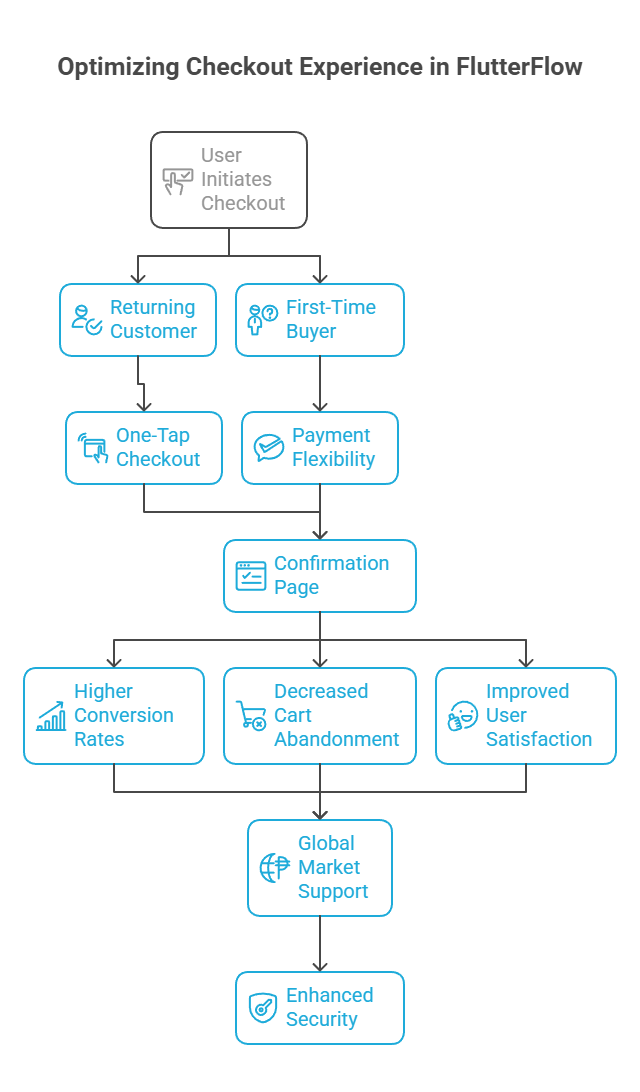
- Returning Customer: One-tap checkout confirmation for returning users with saved payment information
- Payment Flexibility: First-time buyers choosing from credit cards, Apple Pay, Google Pay, PayPal, Stripe, or Buy Now Pay Later options like Klarna or Afterpay
- Auto-Fill Convenience: Automatic population of previous addresses and payment details to minimize typing
- Global Support: International users see localized currency and region-appropriate payment providers
Building Checkout Systems in FlutterFlow
Technical Implementation:
User Profile and Saved Information:
- Store user addresses and payment preferences securely in Firebase or Supabase
- Allow users to manage saved payment methods in "My Account" sections
One-Click Checkout Flow:
- Pre-fill addresses and payment options for logged-in users
- Create single-step checkout actions in FlutterFlow
- Display clean confirmation pages post-purchase
Multiple Payment Gateway Integration:
- Stripe for credit/debit cards and digital wallets
- PayPal for global payment processing
- Razorpay for Indian market coverage
- Apple Pay and Google Pay for mobile-optimized payments
- Buy Now Pay Later services integration
- Custom API calls for additional payment providers
Localized Payment Logic:
- Detect user region and currency using Geo-IP APIs
- Display relevant payment options based on geographical location
- Support multiple currencies with real-time conversion
Security Implementation:
- Ensure PCI-DSS compliance through certified payment gateways
- Implement secure payment handling with FlutterFlow's authentication and tokenization
Checkout Optimization Benefits
- Higher conversion rates through reduced friction
- Decreased cart abandonment with streamlined processes
- Improved user satisfaction through payment convenience
- Global market support with localized payment options
- Enhanced security and user trust through compliant payment processing
8. Intelligent Push Notification Strategy

Re-Engaging Users Effectively
Push notifications are powerful tools for bringing users back, increasing engagement, and driving sales. In 2026, generic alerts won't suffice - your FlutterFlow eCommerce app's push notifications must be smart, timely, and personalized to achieve meaningful results.
Well-crafted push notifications remind users about sales, abandoned cart items, or restocked products. However, irrelevant or excessive notifications lead to user annoyance and app uninstalls. Strategic notification approaches help FlutterFlow apps build stronger relationships, boost engagement, and generate conversions through thoughtful user re-engagement.
Effective Push Notification Examples
Smart notification strategies:
- Cart Recovery: "You left items in your cart - complete your order before midnight to save 10%!"
- Inventory Alerts: "Back in stock: your favorite sneakers - buy them before they're gone!"
- Reward Notifications: "Congratulations! You've earned 100 reward points - use them now"
- Time-Sensitive Offers: "Sale ends in 3 hours - don't miss the best deals!"
These notifications are personal, relevant, actionable, and motivating rather than merely informative.
Implementing Push Notifications in FlutterFlow
Technical Setup:
Basic Notification Infrastructure:
- Configure Firebase Cloud Messaging (FCM) for iOS and Android push notifications
- Set up user-specific and group notifications using FlutterFlow's built-in functionality
User Preference Management:
- Create notification preference settings allowing users to opt-in/opt-out of specific notification types
- Store preferences in Firestore or Supabase for personalized notification targeting
Logic-Based Notification Triggers:
- Use Firebase Functions or BuildShip workflows to trigger:
- Abandoned cart reminders
- Price drop alerts for wishlist items
- New arrival notifications for followed categories
- Order status updates with tracking information
Personalization and Optimization:
- Include user names, product interests, and behavioral data in notifications
- Schedule notifications based on user time zones and optimal engagement times
- A/B test notification content and timing for maximum effectiveness
Performance Tracking:
- Monitor open rates and actions taken from notifications
- Analyze which notification types drive the most engagement and conversions
Push Notification Benefits
- Increased user engagement and app retention
- Higher conversion rates through targeted re-engagement
- Reduced cart abandonment with timely reminders
- Brand awareness maintenance keeping your app top-of-mind
- Personalized experiences strengthening user-brand connections
9. Strategic Abandoned Cart Recovery System
Reclaiming Lost Revenue Opportunities
It's common for customers to add items to their cart only to get distracted and leave without completing their purchase. While they didn't complete the transaction, that sale isn't necessarily lost. Abandoned cart reminders represent one of the most effective features for serious FlutterFlow eCommerce apps in 2025.
Studies show that over 70% of online shopping carts are abandoned, representing significant potential revenue left unrealized. Abandoned cart recovery systems are proven methods for reclaiming those lost sales through push notifications, emails, or in-app messages delivered at optimal times.
Abandoned Cart Recovery Examples
Effective cart recovery sequences:
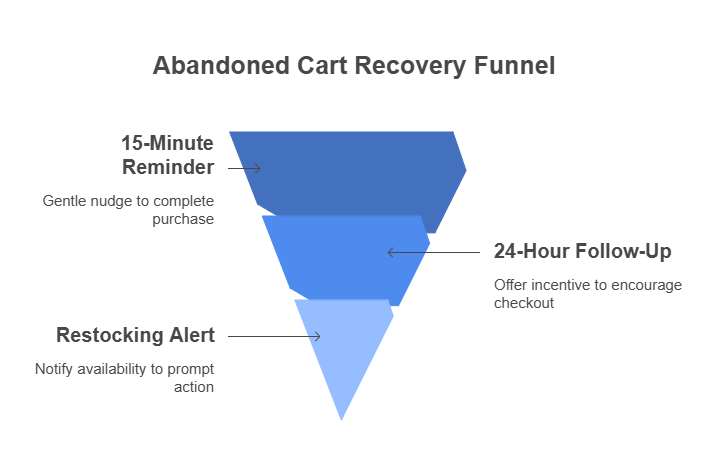
- 15-minute reminder: "Looks like you forgot something - complete your order now for free shipping!"
- 24-hour follow-up: "Still thinking it over? Here's 10% off if you check out in the next 2 hours!"
- Restocking alert: "Good news! The item in your cart is available again and waiting for you"
These reminders are friendly, timely, and designed to motivate action without being pushy.
Building Cart Recovery in FlutterFlow
Technical Implementation:
Cart Activity Tracking:
- Record cart and product data in real-time using Firebase Firestore or Supabase
- Timestamp last activity to identify when carts become "abandoned"
Automated Reminder Triggers:
- Use Firebase Functions or BuildShip workflows to monitor for user inactivity
- Trigger notifications after predetermined timeframes:
- First reminder: 15 minutes after abandonment
- Second reminder: 24 hours after abandonment
- Final reminder: 72 hours with special incentive
Personalized Recovery Messages:
- Include product names, images, and user names for personal touch
- Offer incentives like discounts or free shipping to encourage completion
- Create urgency with limited-time offers
Multi-Channel Recovery Approach:
- Push notifications via FCM
- In-app banners when users return
- Email campaigns using Mailchimp, Resend, or SendGrid
Cart Recovery Benefits
- Revenue reclamation with minimal additional effort
- Improved customer experience through helpful reminders
- Higher conversion rates through urgency and value creation
- User behavior insights for UX optimization
- Brand engagement maintaining positive customer relationships
10. Multilingual Support for Global Market Expansion

Expanding International Reach
By 2025, eCommerce operates at a global scale. Your next potential customer could be anywhere in the world, making multilingual support essential rather than optional for FlutterFlow eCommerce apps. When users can browse and shop in their native language, they feel more comfortable, respected, and are significantly more likely to trust and purchase from your brand.
Research shows that 72% of consumers are more likely to buy products when information is presented in their native language. Multilingual eCommerce support can dramatically improve international reach, engagement, and sales by removing language barriers and opening your store to global opportunities.
Real-World Multilingual Examples
Global user experiences:
- French users see everything in French: menus, product names, descriptions, and checkout processes
- Mexican shoppers browse in Spanish with Mexican pesos and Spanish date formats
- Indian customers choose between Hindi, English, or regional languages for truly inclusive shopping
Multilingual support also assists with localized marketing, SEO optimization, and international search result visibility.
Implementing Multilingual Support in FlutterFlow
Technical Setup:
FlutterFlow Localization:
- Enable multiple locales in Project settings (en, fr, es, hi, etc.)
- Add translations via .arb files or directly in FlutterFlow's interface
Language Detection and Selection:
- Automatically detect user device language as default
- Provide manual language switching options in app menus
- Save user language preferences for future sessions
Dynamic Content Localization:
- Store product names, descriptions, and banners in multiple languages in your database
- Load content dynamically based on user locale selection
- Implement Firebase or Supabase queries for language-specific content
Regional Customization:
- Adapt currency, date formats, and measurement units based on user region
- Use FlutterFlow's preview tools to test different languages simultaneously
Multilingual Support Benefits
- Enhanced trust and loyalty from international customers
- Expanded market reach without building separate applications
- Improved customer experience through cultural inclusivity
- Better international SEO and search discoverability
- Competitive advantage in global markets
Conclusion: Building Future-Ready FlutterFlow eCommerce Apps
In today's digital-first economy, building a basic eCommerce app is no longer enough—businesses must create engaging, intelligent, and seamless shopping experiences. As customer expectations continue to rise in 2026, successful FlutterFlow eCommerce apps must be fast, intuitive, scalable, and feature-rich.
FlutterFlow makes it easier than ever to turn innovative ideas into production-ready applications. With visual development tools, real-time integrations, custom logic, and support for advanced features such as AI recommendations, voice assistants, AR product previews, and multilingual experiences, businesses of all sizes can build next-generation eCommerce solutions faster than ever before.
Key Takeaways for FlutterFlow eCommerce Success
The 10 essential features covered in this comprehensive guide represent the building blocks for creating future-ready mobile commerce applications that attract, engage, and retain users:
- AI-Powered Product Recommendations for personalized shopping
- Voice Search and AI Chat Assistants for conversational commerce
- Augmented Reality Visualization for confident purchasing decisions
- Real-Time Stock and Dynamic Pricing for transparent shopping
- Advanced Filtering and Sorting for efficient product discovery
- Loyalty Programs and Rewards for customer retention
- One-Click Checkout with Multiple Payment Options for conversion optimization
- Intelligent Push Notifications for user re-engagement
- Abandoned Cart Recovery for revenue reclamation
- Multilingual Support for global market expansion
Final Recommendations
Success in FlutterFlow eCommerce development goes beyond building functional applications—it requires creating experiences that users genuinely enjoy. The most successful eCommerce apps are built on four key pillars: speed, simplicity, personalization, and trust.
Whether you're a startup launching your first product, a development team scaling your platform, or an agency building solutions for clients, focusing on these principles will help you create scalable, high-converting eCommerce applications that drive customer loyalty and long-term growth.


View more blogs
.png)

.png)


.png)

.png)

.png)
Ready to develop your own product? Get in touch today!
Get in Touch
